<?xml version="1.0" encoding="utf-8"?><feed xmlns="http://www.w3.org/2005/Atom" ><generator uri="https://jekyllrb.com/" version="3.10.0">Jekyll</generator><link href="http://riscv.epcc.ed.ac.uk/atom.xml" rel="self" type="application/atom+xml" /><link href="http://riscv.epcc.ed.ac.uk/" rel="alternate" type="text/html" /><updated>2026-05-18T03:00:38+00:00</updated><id>http://riscv.epcc.ed.ac.uk/atom.xml</id><title type="html">ExCALIBUR H&amp;amp;ES RISC-V testbed</title><subtitle>A RISC-V test environment for scientific and data-science codes</subtitle><author><name>EPCC RISC-V testbed team</name></author><entry><title type="html">RISC-V soft-core support</title><link href="http://riscv.epcc.ed.ac.uk/issues/PetaLinux-NFS-config/" rel="alternate" type="text/html" title="RISC-V soft-core support" /><published>2024-02-12T00:00:00+00:00</published><updated>2024-02-12T00:00:00+00:00</updated><id>http://riscv.epcc.ed.ac.uk/issues/PetaLinux-NFS-config</id><content type="html" xml:base="http://riscv.epcc.ed.ac.uk/issues/PetaLinux-NFS-config/"><![CDATA[<p>As well as supporting physical hardware (e.g. Allwinner D1, SiFive U74, and 64-core SOPHGO SG2042 CPUs), the testbed also supports RISC-V soft-cores running on an ADM-PA101, which is an AMD/Xilinx Versal FPGA equipped with 16GB DDR.</p>
<h2 id="background">Background</h2>
<p>In order to simplify development, the ADM-PA101 has been set up to run PetaLinux, to allow the soft-cores to be added to the Slurm cluster as the card has Ethernet access. To enable this, we need to configure PetaLinux to boot via ‘tftp’ and mount its root filesystem over NFS.</p>

<h3 id="networking--mac-address-configuration">Networking / MAC address configuration</h3>
<p>By default, PetaLinux configures the Ethernet port with a random MAC address. To allow a DHCP assigned IP address based on the MAC address, the following variables need to be set:</p>

<div class="language-plaintext highlighter-rouge"><div class="highlight"><pre class="highlight"><code>CONFIG_SUBSYSTEM_ETHERNET_VERSAL_CIPS_0_PSPMC_0_PSV_ETHERNET_0_MAC="00:c0:ff:ee:00:00"
CONFIG_SUBSYSTEM_ETHERNET_VERSAL_CIPS_0_PSPMC_0_PSV_ETHERNET_0_USE_DHCP=y
</code></pre></div></div>

<p>The hostname can be set as using <code class="language-plaintext highlighter-rouge">CONFIG_SUBSYSTEM_HOSTNAME="fpga01"</code>.</p>

<h3 id="root-filesystem-user-configuration">Root filesystem user configuration</h3>
<p>The default PetaLinux configuration will set up <code class="language-plaintext highlighter-rouge">root</code> and <code class="language-plaintext highlighter-rouge">petalinux</code> users. This configration can be overridden as follows:</p>
<div class="language-plaintext highlighter-rouge"><div class="highlight"><pre class="highlight"><code>CONFIG_ADD_EXTRA_USERS="root:root;user1:initialpassword;"
CONFIG_CREATE_NEW_GROUPS="aie;"
CONFIG_ADD_USERS_TO_GROUPS="user1:audio,video,aie;"
CONFIG_ADD_USERS_TO_SUDOERS="user1"
</code></pre></div></div>
<blockquote>
  <p>NOTE: This sets the default <code class="language-plaintext highlighter-rouge">root</code> password to ‘root’ and should be changed. The <code class="language-plaintext highlighter-rouge">petalinux-build</code> command will raise a warning to remind you to change this.</p>
</blockquote>

<p>In the above example, <code class="language-plaintext highlighter-rouge">user1</code> has <code class="language-plaintext highlighter-rouge">sudo</code> access through the addition of <code class="language-plaintext highlighter-rouge">CONFIG_ADD_USERS_TO_SUDOERS="user1"</code>. The example also shows how groups can be added.</p>

<blockquote>
  <p>NOTE: The first build of PetaLinux should be used to create the root filesystem (or use <code class="language-plaintext highlighter-rouge">petalinux-build -c rootfs</code> to rebuild), which should then be expanded into the NFS share directory (e.g. <code class="language-plaintext highlighter-rouge">/tftpboot/nfsroot</code>).</p>
</blockquote>

<h3 id="root-filesystem-over-nfs-configuration">Root filesystem over NFS configuration</h3>
<p>Using NFS for the root filesystem should be a trivial configuration change using <code class="language-plaintext highlighter-rouge">petalinux-config</code>. However, by default, the Xilinx PetaLinux configuration uses NFS v4 protocol for the client. Unfortunately, this is incompatible with the default Debian NFS server running on our login node. The answer is to force the PetaLinux boot to use NFS v3 which can be set in the <code class="language-plaintext highlighter-rouge">BOOTARGS</code> using the PetaLinux config UI or in the BOOTARGS variable of <code class="language-plaintext highlighter-rouge">project-spec/configs/config</code> file in the PetaLinux project directory (<code class="language-plaintext highlighter-rouge">sw/petalinux/base</code>):</p>

<p><code class="language-plaintext highlighter-rouge">CONFIG_SUBSYSTEM_BOOTARGS_GENERATED="console=ttyAMA0  earlycon=pl011,mmio32,0xFF000000,115200n8 clk_ignore_unused root=/dev/nfs nfsroot=c0.ff.ee.00:/tftpboot/nfsroot,tcp,v3 ip=dhcp rw"</code></p>

<p>Here we can see that the root file system is being set to a NFS mount (<code class="language-plaintext highlighter-rouge">root=/dev/nfs</code>) with the <code class="language-plaintext highlighter-rouge">nfsroot</code> option including the server and path, as well as forcing <code class="language-plaintext highlighter-rouge">tcp</code> and <code class="language-plaintext highlighter-rouge">v3</code> of the NFS protocol.</p>

<h2 id="issues">Issues</h2>
<p>Unfortunately, the <code class="language-plaintext highlighter-rouge">CONFIG_SUBSYSTEM_BOOTARGS_GENERATED</code> setting, as the name suggests, is generated and gets wiped during the build. Therefore, the documentation states that the boot command arguments need to be placed in the chosen section of <code class="language-plaintext highlighter-rouge">sw/petalinux/system-user.dtsi</code> as follows:</p>
<div class="language-plaintext highlighter-rouge"><div class="highlight"><pre class="highlight"><code>chosen {
	stdout-path = "serial0:115200";
    	bootargs = "console=ttyAMA0 earlycon=pl011,mmio32,0xFF000000,115200n8 clk_ignore_unused root=/dev/nfs nfsroot=c0.ff.ee.00:/tftpboot/nfsroot,tcp,v3 ip=dhcp rw"
};
</code></pre></div></div>

<p>However, this breaks the build when <code class="language-plaintext highlighter-rouge">petalinux-build</code> generates other <code class="language-plaintext highlighter-rouge">.dtsi</code> files and we are unable to proceed further.</p>

<h2 id="workaround-for-the-risc-v-testbed">Workaround for the RISC-V testbed</h2>
<p>After much experimentation, the following approach can be used to build a PetaLinux image for the uSD card that will boot over ‘tftp’ and mount the root filesystem over NFS.</p>

<ol>
  <li>Expand the AlphaData supplied <code class="language-plaintext highlighter-rouge">ps_base_sw-admpa101-v1_2_0.tar.gz</code> in a working directory</li>
  <li>Setup PetaLinux and Vivado environment (assuming Bash on Linux):
    <ul>
      <li><code class="language-plaintext highlighter-rouge">source &lt;petalinux_tools_directory&gt;/settings.
sh</code></li>
      <li><code class="language-plaintext highlighter-rouge">source &lt;vivado_directory&gt;/settings64.sh</code></li>
    </ul>
  </li>
  <li><code class="language-plaintext highlighter-rouge">cd ps_base_sw-admpa101-v1_2_0/fpga/proj/base</code>
    <ul>
      <li>Run<code class="language-plaintext highlighter-rouge">vivado -mode batch -source mkxpr-base.tcl</code></li>
      <li>When complete, <code class="language-plaintext highlighter-rouge">vivado -mode batch -source do_build.tcl</code></li>
    </ul>
  </li>
  <li><code class="language-plaintext highlighter-rouge">cd ps_base_sw-admpa101-v1_2_0/sw/petalinux</code>
    <ul>
      <li><code class="language-plaintext highlighter-rouge">petalinux-create -t project -s ../../os/simple.bsp</code></li>
    </ul>
  </li>
  <li><code class="language-plaintext highlighter-rouge">cd simple</code></li>
  <li><code class="language-plaintext highlighter-rouge">petalinux-build</code></li>
  <li>Make a cup of tea / coffee, drink slowly and wait…</li>
  <li>Either:
    <ul>
      <li>Create a patch to the config file to add DHCP and NFS support using <code class="language-plaintext highlighter-rouge">diff</code></li>
      <li>Copy the patch (here <code class="language-plaintext highlighter-rouge">config.patch</code>) to <code class="language-plaintext highlighter-rouge">ps_base_sw-admpa101-v1_2_0/sw/petalinux/simple</code></li>
      <li><code class="language-plaintext highlighter-rouge">patch -b project-spec/configs/config config.patch</code></li>
    </ul>
  </li>
  <li>Or:
    <ul>
      <li>Edit the <code class="language-plaintext highlighter-rouge">project-spec/configs/config</code> directly to make the required changes above</li>
    </ul>
  </li>
  <li><code class="language-plaintext highlighter-rouge">petalinux-build</code></li>
  <li><code class="language-plaintext highlighter-rouge">petalinux-package --boot --u-boot</code> (builds <code class="language-plaintext highlighter-rouge">BOOT.BIN</code>)</li>
  <li>Copy <code class="language-plaintext highlighter-rouge">image.ub</code>, <code class="language-plaintext highlighter-rouge">boot.scr</code> and <code class="language-plaintext highlighter-rouge">BOOT.BIN</code> from <code class="language-plaintext highlighter-rouge">/tftpboot</code> to the uSD card (<code class="language-plaintext highlighter-rouge">petalinux-build</code> will place the files in <code class="language-plaintext highlighter-rouge">/tftpboot</code> by default).</li>
</ol>

<blockquote>
  <p><strong>Note:</strong>
Ignore the following warning as once NFS is enabled, the user accounts will be configured from the NFS root file system:</p>

  <p><em>WARNING: petalinux-image-minimal-1.0-r0 do_rootfs: Enabling autologin to user root.  This configuration should NOT be used in production!</em></p>
</blockquote>

<blockquote>
  <p>As mentioned above, this build assumes that there is an expanded <code class="language-plaintext highlighter-rouge">rootfs</code> for the ARM cores in <code class="language-plaintext highlighter-rouge">/tftpboot/nfsroot</code> (previous <code class="language-plaintext highlighter-rouge">petalinux-build -c rootfs</code>)</p>
</blockquote>]]></content><author><name>EPCC RISC-V testbed team</name></author><category term="Issues" /><summary type="html"><![CDATA[As well as supporting physical hardware (e.g. Allwinner D1, SiFive U74, and 64-core SOPHGO SG2042 CPUs), the testbed also supports RISC-V soft-cores running on an ADM-PA101, which is an AMD/Xilinx Versal FPGA equipped with 16GB DDR. Background In order to simplify development, the ADM-PA101 has been set up to run PetaLinux, to allow the soft-cores to be added to the Slurm cluster as the card has Ethernet access. To enable this, we need to configure PetaLinux to boot via ‘tftp’ and mount its root filesystem over NFS.]]></summary></entry><entry><title type="html">International workshop on RISC-V for HPC co-hosted at EuroPar 2024</title><link href="http://riscv.epcc.ed.ac.uk/workshops/europar24/" rel="alternate" type="text/html" title="International workshop on RISC-V for HPC co-hosted at EuroPar 2024" /><published>2024-02-11T00:00:00+00:00</published><updated>2024-02-11T00:00:00+00:00</updated><id>http://riscv.epcc.ed.ac.uk/workshops/europar24</id><content type="html" xml:base="http://riscv.epcc.ed.ac.uk/workshops/europar24/"><![CDATA[<h2 id="important-dates">Important dates</h2>
<p><img align="right" src="https://2024.euro-par.org/fileadmin/2024/logos/Euro-Par-2024-logo_sp.svg" /></p>

<ul>
  <li><strong>Paper Deadline:</strong> 6th May 2024 (AoE)</li>
  <li><strong>Author Notification:</strong> 20th June 2024</li>
  <li><strong>Camera Ready:</strong> 1st July 2024</li>
  <li><strong>Workshop:</strong> 26th or 27th August 2024</li>
</ul>

<h2 id="workshop-details">Workshop details</h2>
<p>Co-located with EuroPar 2024, this is workshop will be held on the 26th or 27th of August in Madrid, Spain.</p>

<h2 id="workshop-scope">Workshop scope</h2>
<p>The goal of this workshop is to continue building the community of RISC-V in HPC, sharing the benefits of this technology with domain scientists, tool developers, and supercomputer operators. RISC-V is an open standard Instruction Set Architecture (ISA) which enables the royalty free development of CPUs and a common software ecosystem to be shared across them. Following this community driven ISA standard, a very diverse set of CPUs have been, and continue to be, developed which are suited to a range of workloads. Whilst RISC-V has become very popular already in some fields, and in 2022 the ten billionth RISC-V core was shipped, to date it has yet to gain traction in HPC.</p>

<p>However, there are numerous potential advantages that RISC-V can provide to HPC and, assuming the significant rate of growth of this technology to date continues, as we progress further into the decade it is highly likely that RISC-V will become more relevant and widespread for HPC workloads. Furthermore, recent advances in RISC-V make it a more realistic proposition for HPC workloads than ever before. An example of this is vectorisation extension which provides important performance advantages for HPC workloads but was only standardised in early 2022, and-so we are only now seeing mature CPUs that fully implement this.</p>

<p>The open and standardised nature of RISC-V means that the large, and growing community, can be involved in shaping the standard and tooling. This is important from two perspectives, firstly it is our opportunity in the HPC community to help shape the future of RISC-V to ensure that it is suitable for the next generation of supercomputers. Secondly, whilst there are a wide variety of RISC-V CPUs currently available, the standard nature of the tooling means that very often the same software ecosystem comprising the compiler, operating system, and libraries will run across these whilst requiring few changes.</p>

<p>This workshop aims to bring together those already looking to popularise RISC-V in the field of HPC with the supercomputing community at-large. By sharing benefits of the architecture, success stories, and techniques we hope to further popularise the technology and increase involvement by the community.</p>

<h2 id="call-for-papers---workshop-topics">Call for papers - workshop topics</h2>

<p>We invite submissions of high-quality, original research results and works-in-progress on RISC-V with a general connection to HPC. Topics of interest for this workshop include (but are not limited to):</p>

<ul>
  <li>Example use-cases and case-studies that use RISC-V</li>
  <li>Lessons learnt from leveraging RISC-V in HPC</li>
  <li>Industry papers exploring the use of RISC-V</li>
  <li>The porting of codes to RISC-V</li>
  <li>Novel hardware and accelerators built upon RISC-V</li>
  <li>Tools and techniques to aid in the use of RISC-V for HPC</li>
  <li>Developments in HPC libraries to port them to RISC-V</li>
  <li>Enhancements to RISC-V to make the architecture more suited for HPC</li>
  <li>Compiler and runtime support for RISC-V</li>
  <li>The RISC-V ecosystem</li>
  <li>Future gazing how RISC-V might evolve the HPC community</li>
  <li>And anything else related to RISC-V and HPC!</li>
</ul>

<h3 id="paper-submission">Paper submission</h3>

<p>Authors are invited to submit unpublished, original work. Accepted papers will appear in the post-conference workshop proceedings in the Springer Lecture Notes in Computer Science (LNCS) series and submitted versions available online for the workshop. Submissions of original work between 10 and 12 pages (the page count does not include references) are welcomed on work-in-progress, position papers, or mature work. All papers should be submitted via EasyChair <a href="https://easychair.org/conferences/?conf=europar24-ws-phd-poster-whpc">here</a></p>

<p>All papers should be formatted Springer single column LNCS style, with formatting information and templates <a href="https://www.springer.com/gp/computer-science/lncs/conference-proceedings-guidelines">here</a></p>

<h2 id="organisation">Organisation</h2>

<h3 id="organising-committee">Organising committee</h3>

<ul>
  <li>Nick Brown (EPCC at the University of Edinburgh)</li>
  <li>Michael Wong (Codeplay)</li>
  <li>John Davis (Independent)</li>
</ul>

<h3 id="program-committee">Program committee</h3>

<ul>
  <li>Oliver Perks (Rivos)</li>
  <li>John Leidel (Tactical Computing Labs)</li>
  <li>Maurice Jamieson (EPCC)</li>
  <li>Ruyman Reyes (Codeplay)</li>
  <li>Luis Plana (BSC)</li>
  <li>Joseph Lee (EPCC)</li>
  <li>Luc Berger-Vergait (Sandia National Laboratories)</li>
  <li>Teresa Cervero (BSC)</li>
  <li>Chris Taylor (Tactical Computing Labs)</li>
  <li>John Davis</li>
</ul>]]></content><author><name>EPCC RISC-V testbed team</name></author><category term="Workshops" /><summary type="html"><![CDATA[Important dates]]></summary></entry><entry><title type="html">Third International workshop on RISC-V for HPC</title><link href="http://riscv.epcc.ed.ac.uk/workshops/hpcasia/" rel="alternate" type="text/html" title="Third International workshop on RISC-V for HPC" /><published>2024-01-01T00:00:00+00:00</published><updated>2024-01-01T00:00:00+00:00</updated><id>http://riscv.epcc.ed.ac.uk/workshops/hpcasia</id><content type="html" xml:base="http://riscv.epcc.ed.ac.uk/workshops/hpcasia/"><![CDATA[<h2 id="logistics">Logistics</h2>
<p><img align="right" src="/images/HPCAsia2024logo.png" width="150" /></p>

<p>Co-located with <a href="https://sighpc.ipsj.or.jp/HPCAsia2024/">HPC Asia 2024</a>, this workshop will run between 08:30 and 12:30 on the morning of January 25th 2024 in Nagoya, Japan</p>

<h2 id="workshop-details">Workshop details</h2>

<p>The goal of this workshop is to continue building the community of RISC-V in HPC, sharing the benefits of this technology with domain scientists, tool developers, and supercomputer operators. RISC-V is an open standard Instruction Set Architecture (ISA) which enables the royalty free development of CPUs and a common software ecosystem to be shared across them. Following this community driven ISA standard, a very diverse set of CPUs have been, and continue to be, developed which are suited to a range of workloads. Whilst RISC-V has become very popular already in some fields, and in 2022 the ten billionth RISC-V core was shipped, to date it has yet to gain traction in HPC.</p>

<h2 id="workshop-schedule">Workshop schedule</h2>

<table>
  <thead>
    <tr>
      <th>Time</th>
      <th style="text-align: left">Session</th>
      <th style="text-align: left">Speaker</th>
    </tr>
  </thead>
  <tbody>
    <tr>
      <td>09:00 - 09:10</td>
      <td style="text-align: left">Welcome and aims</td>
      <td style="text-align: left">Michael Wong</td>
    </tr>
    <tr>
      <td>09:10 - 09:50</td>
      <td style="text-align: left"><strong>Keynote:</strong>  Rev: Scalable HPC Workload Simulation using RISC-V in SST (<a href="https://github.com/RISCVtestbed/riscvtestbed.github.io/blob/main/assets/files/hpcasia24/HPCAsiaRVWorkshop_Leidel.pdf">slides</a>)</td>
      <td style="text-align: left">John Leidel</td>
    </tr>
    <tr>
      <td>09:50 - 10:00</td>
      <td style="text-align: left">SG2042 Empowering RISC-V in High-Performance Computing (<a href="https://github.com/RISCVtestbed/riscvtestbed.github.io/blob/main/assets/files/hpcasia24/hpc_asia_wang.pdf">slides</a>)</td>
      <td style="text-align: left">Wang Zihan</td>
    </tr>
    <tr>
      <td>10:00 - 10:30</td>
      <td style="text-align: left">Break</td>
      <td style="text-align: left"> </td>
    </tr>
    <tr>
      <td>10:30 - 11:00</td>
      <td style="text-align: left">E4 Experience with RISC-V in HPC (<a href="https://github.com/RISCVtestbed/riscvtestbed.github.io/blob/main/assets/files/hpcasia24/E4_HPCASIA_2024-V.0.2.pdf">slides</a>)</td>
      <td style="text-align: left">Daniele Gregori</td>
    </tr>
    <tr>
      <td>11:00 - 11:20</td>
      <td style="text-align: left">The phenomenal pace of change making RISC-V more attractive for HPC (<a href="https://github.com/RISCVtestbed/riscvtestbed.github.io/blob/main/assets/files/hpcasia24/risc-v-hpc-asia_Brown.pdf">slides</a>)</td>
      <td style="text-align: left">Nick Brown</td>
    </tr>
    <tr>
      <td>11:20 - 11:50</td>
      <td style="text-align: left">Lessons learned on Cell/B.E. for Hetero Programming Model, and alignments tweaks on RISC-V for Network speeds (<a href="https://github.com/RISCVtestbed/riscvtestbed.github.io/blob/main/assets/files/hpcasia24/RISC-V_Workshop-HPC-AkiraTsukamoto-2024-01-25-3.pdf">slides</a>)</td>
      <td style="text-align: left">Akira Tsukamoto</td>
    </tr>
    <tr>
      <td>11:50 - 12:25</td>
      <td style="text-align: left"><strong>Panel:</strong> Will 2024 be the year for RISC-V in HPC?</td>
      <td style="text-align: left"> </td>
    </tr>
    <tr>
      <td>12:25 - 12:30</td>
      <td style="text-align: left">Conclusions and next steps</td>
      <td style="text-align: left">Nick Brown</td>
    </tr>
  </tbody>
</table>]]></content><author><name>EPCC RISC-V testbed team</name></author><category term="Workshops" /><summary type="html"><![CDATA[Logistics]]></summary></entry><entry><title type="html">Benchmarks update</title><link href="http://riscv.epcc.ed.ac.uk/success/benchmarks/" rel="alternate" type="text/html" title="Benchmarks update" /><published>2023-03-29T00:00:00+00:00</published><updated>2023-03-29T00:00:00+00:00</updated><id>http://riscv.epcc.ed.ac.uk/success/benchmarks</id><content type="html" xml:base="http://riscv.epcc.ed.ac.uk/success/benchmarks/"><![CDATA[<p>Here we summarize the result of some benchmark tests performed on RISC-V <a href="/documentation/hardware/">hardware</a> available as part of the testbed.</p>

<h3 id="rajaperf">RAJAPerf</h3>

<p><a href="https://github.com/LLNL/RAJAPerf">RAJAPerf</a> tests a suite of loop-based computational kernels relevant for HPC.</p>

<h4 id="dongshannezhastu-allwinner-d1-h">DongshanNezhaSTU (Allwinner D1-H)</h4>

<p>The DongshanNezhaSTU board contains the Allwinner D1 C906, which supports the <a href="/issues/compiling-vector/">V vector extension</a> (version 0.7.1). The chip contains 128-bit wide vector registers and supports element sizes up to 32-bit. Because of this, we compiled RAJAPerf with single percision floating points numbers to enable speedup from vectorization.</p>

<p>We also compare the performance against the StarFive JH7110 (VF2), which contains a quad-core SiFive U74, and a Fujitsu Arm A64FX system, which has SIMD instructions (NEON) as well as scalable vectors (SVE). The A64FX processor is designed for HPC applications and completely different in nature to the RISC-V cores, which are designed for embedded and single-board computers (SBC). However, a comparison against the A64FX is still useful as it can highlight important differences and potential design improvements for an HPC-class RISC-V processor in the future. Because the C906 only contains a single core, all benchmarks are run on a single core to enable direct comparison across CPUs, and only NEON with 128-bit vector width is used on A64FX.</p>

<p>The RISC-V results are compiled using the XuanTie GCC 8.4, with <code class="language-plaintext highlighter-rouge">-O3 -march=rv64gcv0p7 -ffast-math</code> for vector and <code class="language-plaintext highlighter-rouge">-O3 -march=rv64gc -ffast-math</code> for scalar, and for Arm we used GCC 11.2 with <code class="language-plaintext highlighter-rouge">-O3 -ffast-math -mcpu=a64fx -march=armv8.2-a+simd+nosve</code> for vector and <code class="language-plaintext highlighter-rouge">-O3 -ffast-math -mcpu=a64fx -march=armv8.2-a+nosimd+nosve</code> for scalar.</p>

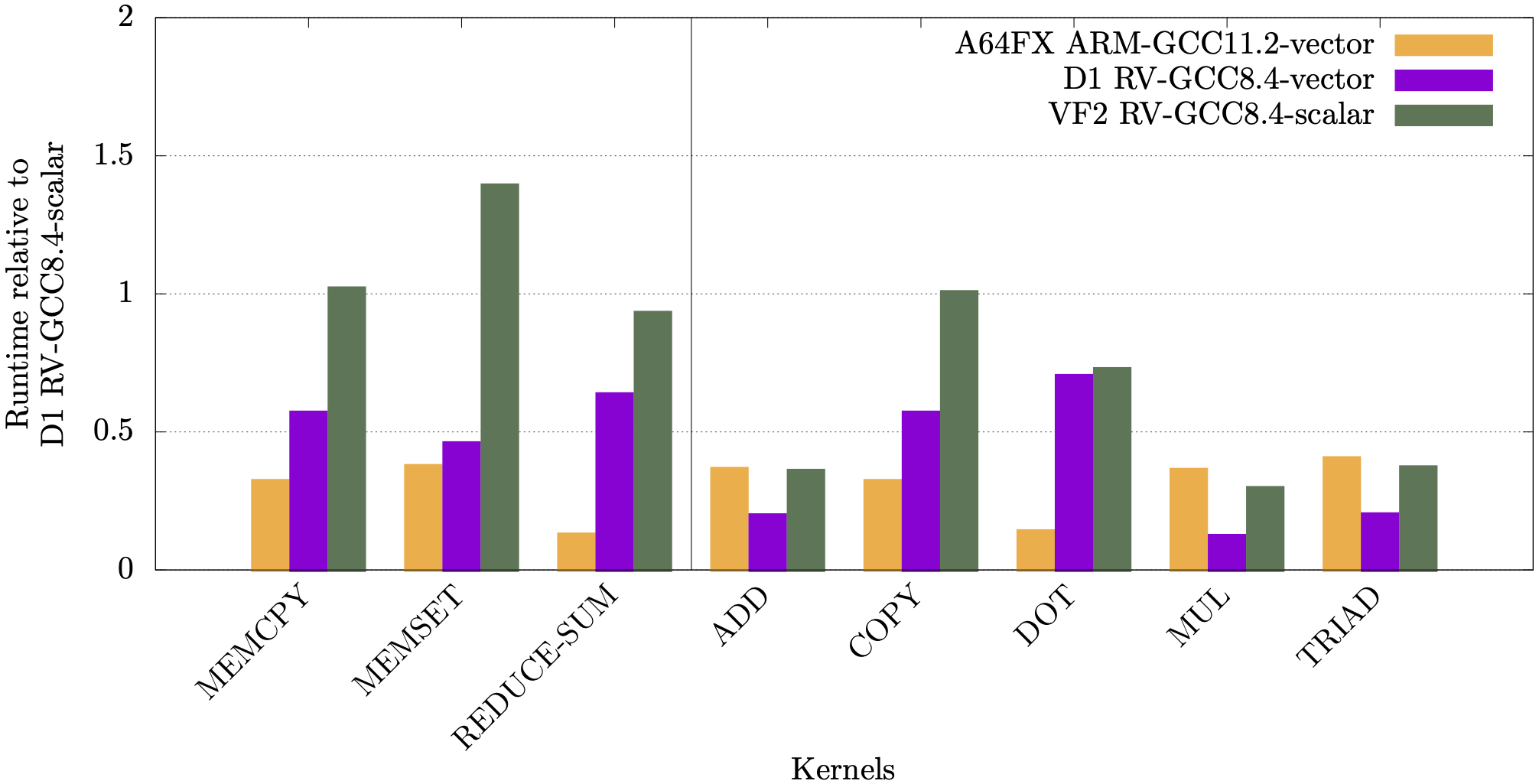
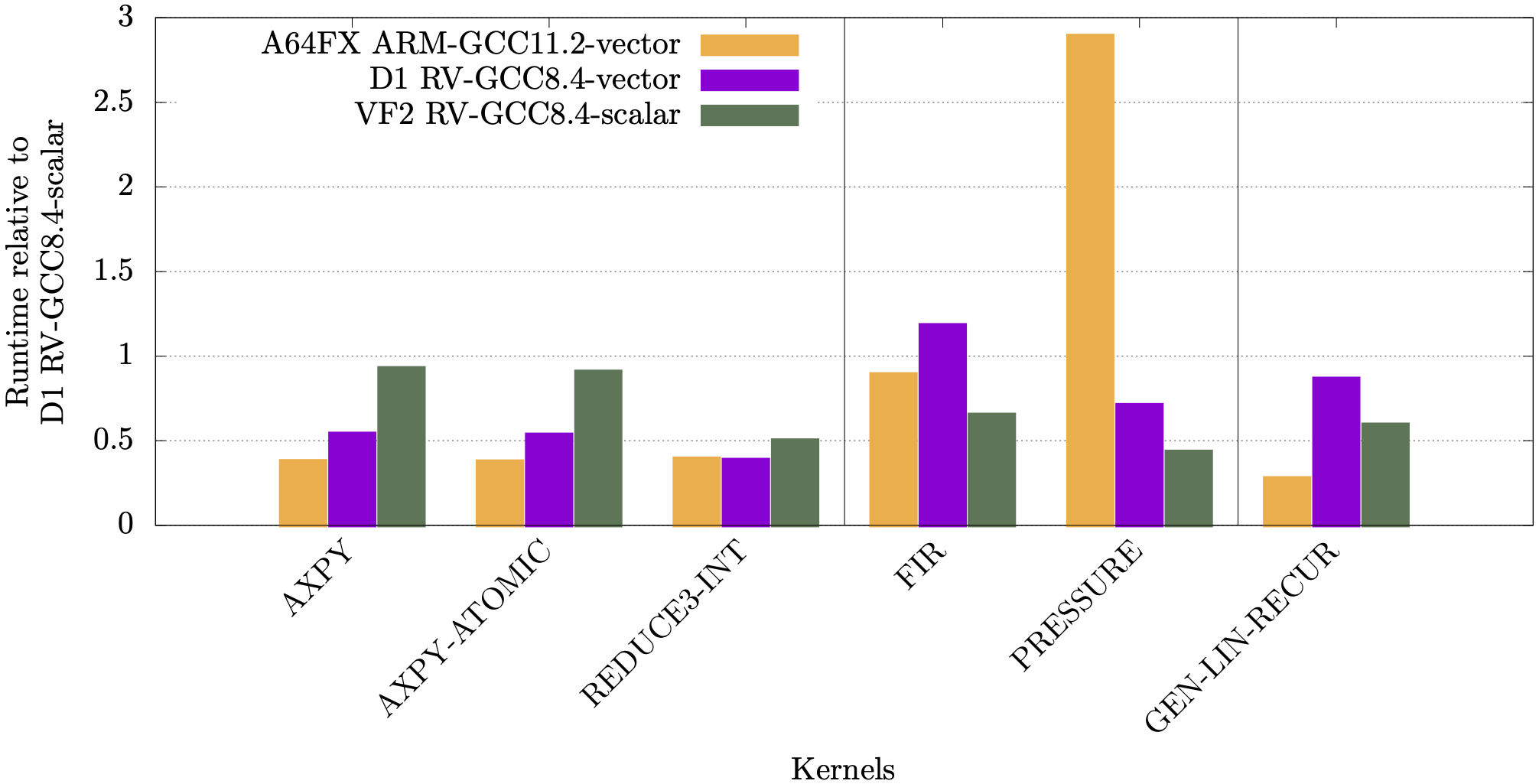
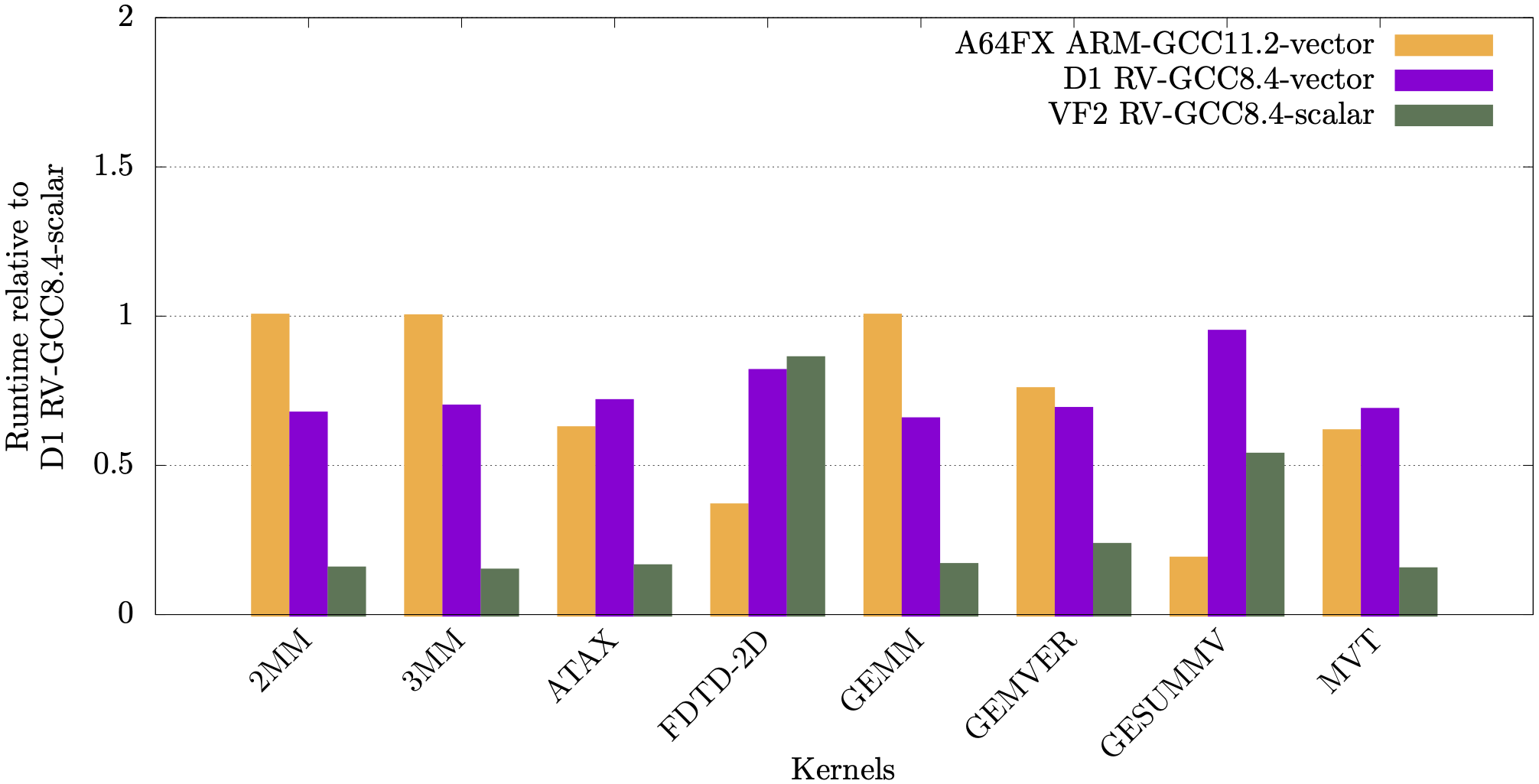
<p>In the following plots we show runtimes for the RAJAPerf kernel normalised against the kernel’s scalar runtime. For the A64FX, normalisation is against running in scalar mode on the A64FX, whereas for the Allwinner D1 and StarFive JH7110 it is normalised against running scalar on the D1. The orange and purple bars show the vectorisation performance difference on the A64FX and D1 respectively, and the green bars show a comparison of the scalar performance between the JH7110 (VF2) and the D1.</p>

<p><img src="/images/gp_status-RV-Arm-comparison-algorithm-stream.png" /></p>

<p><img src="/images/gp_status-RV-Arm-comparison-basic-apps-lcals.png" /></p>

<p><img src="/images/gp_status-RV-Arm-comparison-polybench.png" /></p>

<p>It can be observed from these plots that for most linear algebra kernels, the vectorised code on the RISC-V D1 is faster compared to its scalar counterpart.</p>

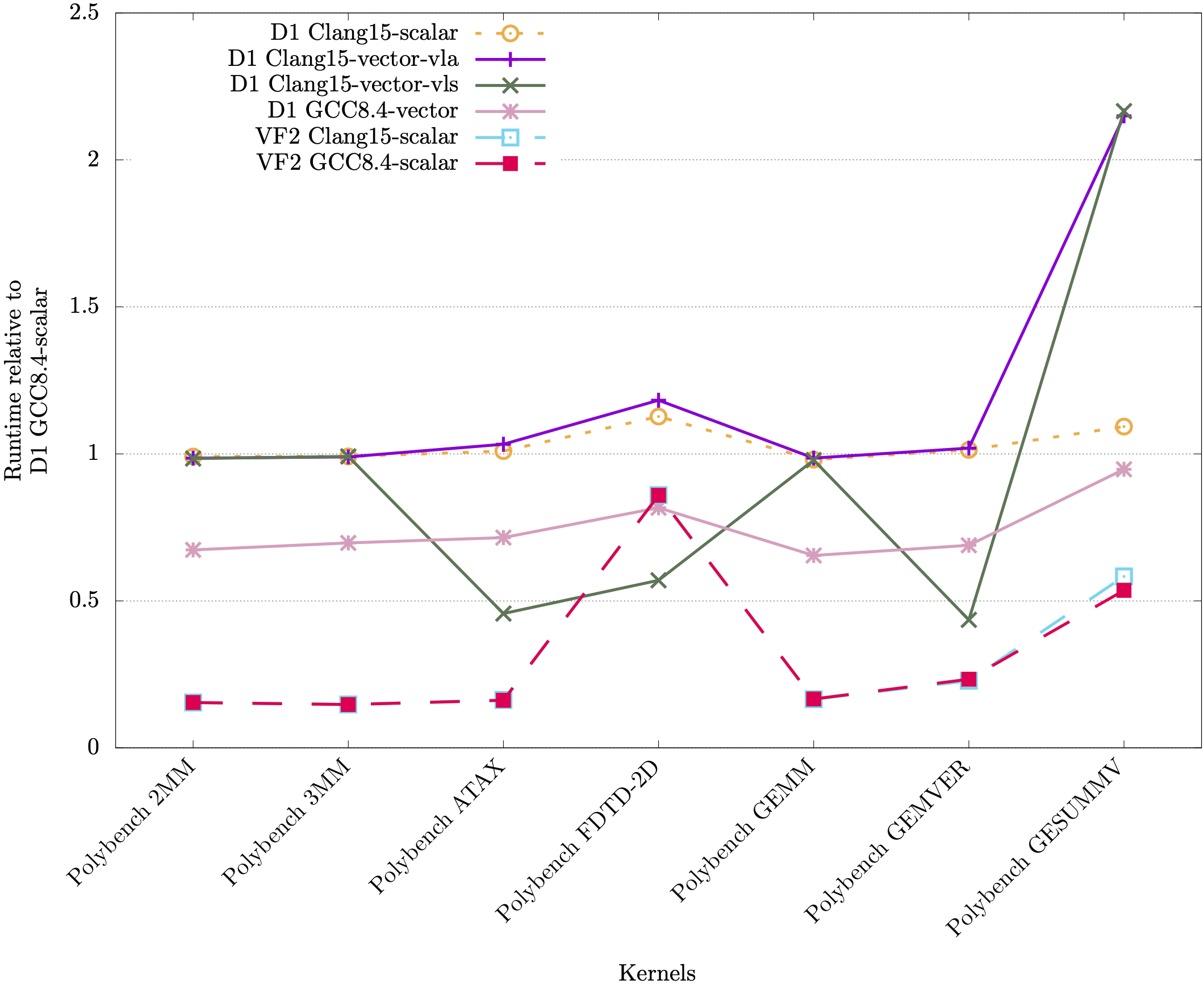
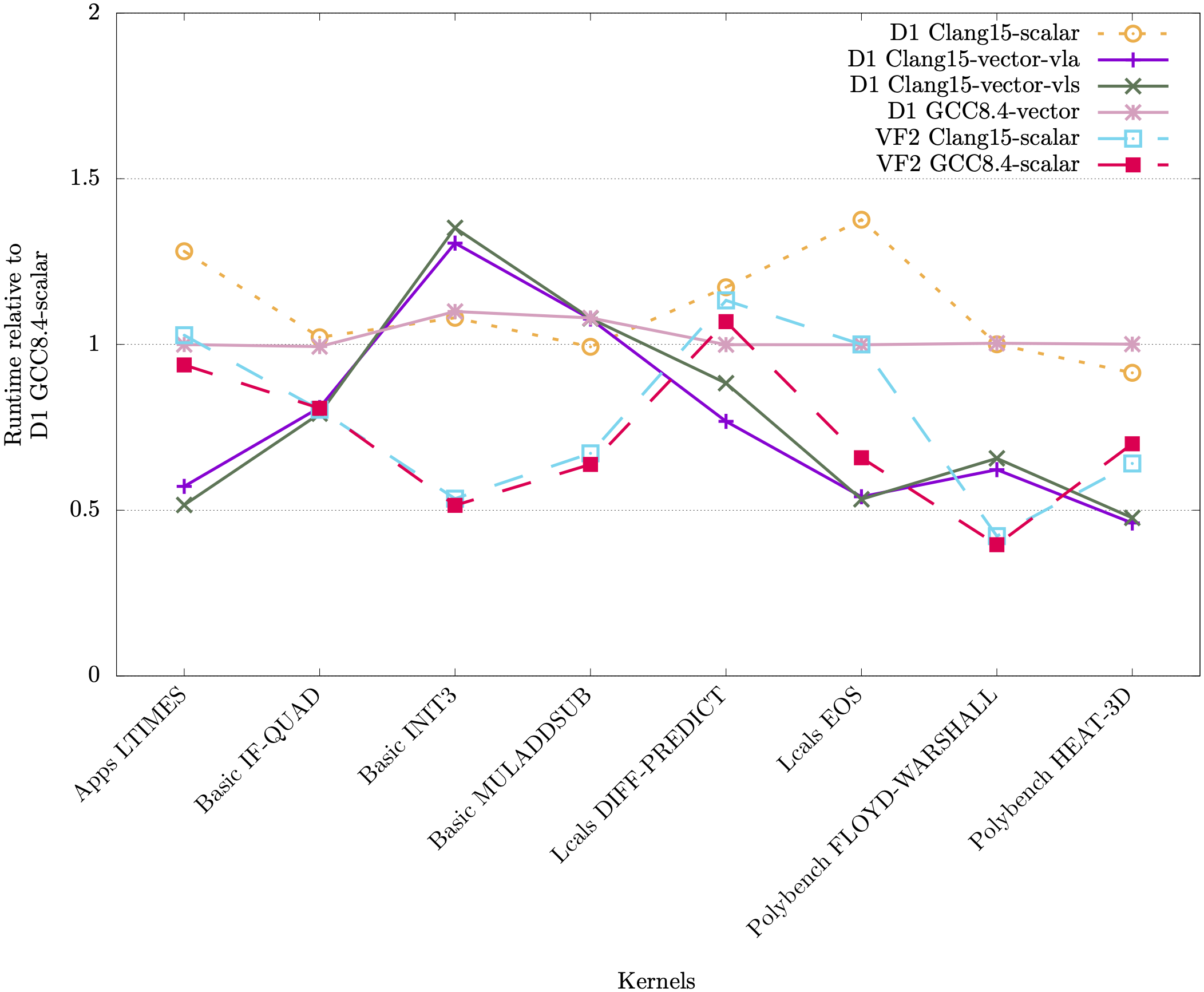
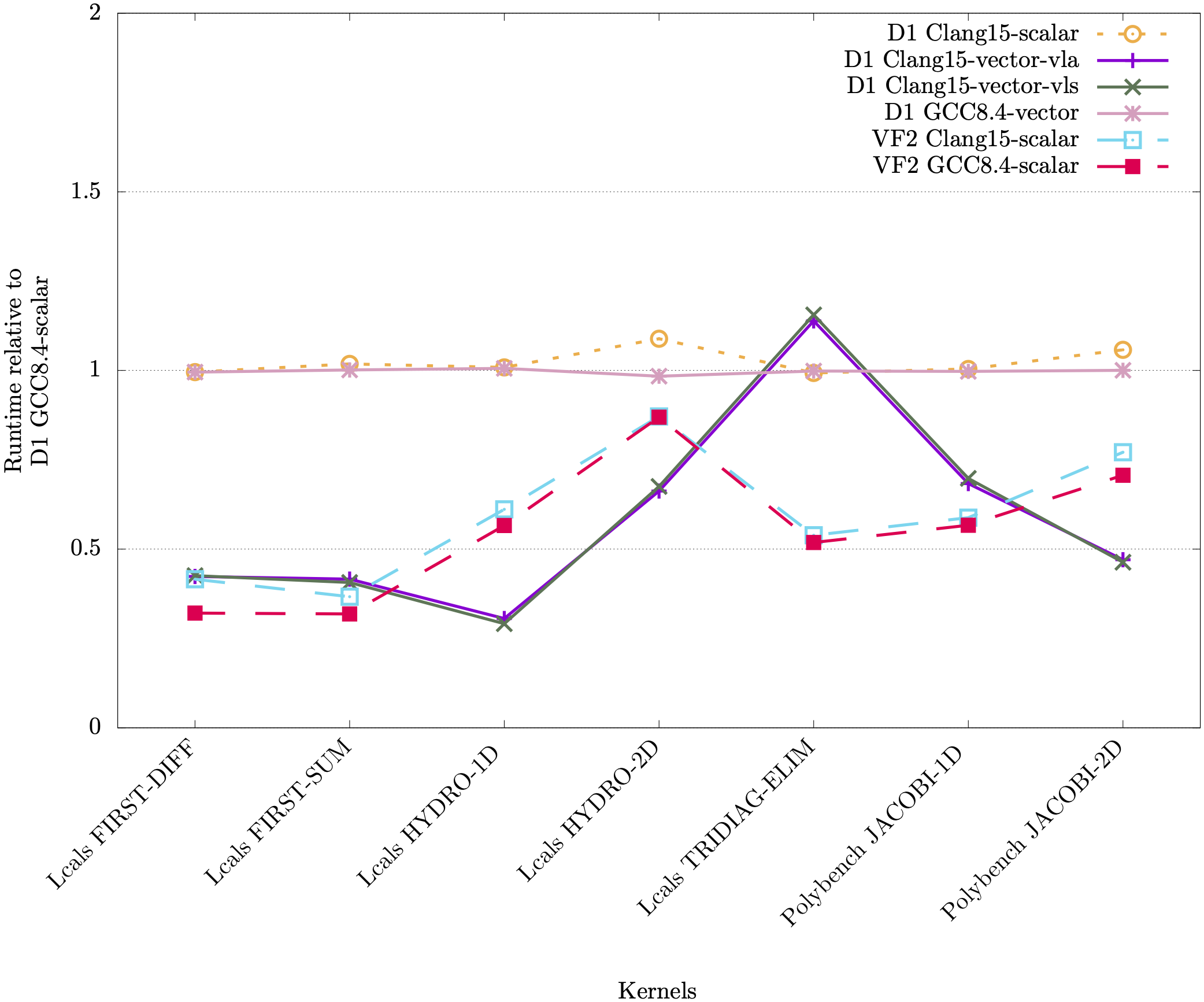
<p>Below we also tested LLVM 15.0, which is able to vectorize more kernels than XuanTie GCC 8.4, but generated RVV 1.0 code. We utilized the RVV-rollback tool <a href="https://github.com/RISCVtestbed/rvv-rollback">https://github.com/RISCVtestbed/rvv-rollback</a> to translate some of the kernels, and the speedup can be seen in the plots below.</p>

<p>Kernels vectorized by GCC:
<img src="/images/gp_tool-RV-comparison-GCC-vec-line.png" /></p>

<p>Kernels not vectorized by GCC:
<img src="/images/gp_tool-RV-comparison-GCC-novec-line.png" /></p>

<p>Kernels vectorized by GCC, but no vector instructions were executed at runtime:
<img src="/images/gp_tool-RV-comparison-GCC-vec-norun-line.png" /></p>

<p>Clang contains settings for vector length specific code (VLS - via <code class="language-plaintext highlighter-rouge">-riscv-v-vector-bits-min=128</code>) and vector length agnostic (VLA - via <code class="language-plaintext highlighter-rouge">-scalable-vectorization=on</code>), which we showed in the plots above. It can be seen that Clang and GCC have different performance in terms of vectorizing and executing vector instructions for the different kernels.</p>

<p>For more details of the above results, see the following publications:</p>

<ol>
  <li>Test-driving RISC-V Vector hardware for HPC, J. K. L. Lee, M. Jamieson, N. Brown, R. Jesus</li>
  <li>Backporting RISC-V vector assembly, J. K. L. Lee, M. Jamieson, N. Brown</li>
</ol>]]></content><author><name>EPCC RISC-V testbed team</name></author><category term="Success" /><summary type="html"><![CDATA[Here we summarize the result of some benchmark tests performed on RISC-V hardware available as part of the testbed.]]></summary></entry><entry><title type="html">Toolchains &amp;amp; Cross-debugging</title><link href="http://riscv.epcc.ed.ac.uk/issues/toolchains+debugging/" rel="alternate" type="text/html" title="Toolchains &amp;amp; Cross-debugging" /><published>2023-01-11T00:00:00+00:00</published><updated>2023-01-11T00:00:00+00:00</updated><id>http://riscv.epcc.ed.ac.uk/issues/toolchains+debugging</id><content type="html" xml:base="http://riscv.epcc.ed.ac.uk/issues/toolchains+debugging/"><![CDATA[<p>In this post we cover the toolchains and debugging tools available to compile applications for RISC-V. These allow users to cross-compile RISC-V executables on the login node, which can then be run on the testbed <a href="/documentation/running_riscv/">nodes</a>. The toolchains provide various binutils, such as <code class="language-plaintext highlighter-rouge">ld</code> - linker, <code class="language-plaintext highlighter-rouge">as</code> - assembler, and <code class="language-plaintext highlighter-rouge">objdump</code> - displays object file information.</p>

<h3 id="gnu-toolchain">GNU toolchain</h3>

<p>The first toolchain is the RISC-V GNU Compuler Toolchain, which is available at <a href="https://github.com/riscv-collab/riscv-gnu-toolchain">https://github.com/riscv-collab/riscv-gnu-toolchain</a>. The README provides comprehensive instructions to compile the toolchain.</p>

<p>Different versions of this toolchain have already been installed on the login node and can be directly be loaded using <code class="language-plaintext highlighter-rouge">module load</code>, following the instructions <a href="/documentation/getting_started/">here</a>. Once loaded, the compilers and binutils can be called directly, e.g.</p>

<div class="language-plaintext highlighter-rouge"><div class="highlight"><pre class="highlight"><code>[username@riscv-login ~]$ module load riscv64-linux/gnu-12.2
[username@riscv-login ~]$ riscv64-unknown-linux-gnu-gcc --version
riscv64-unknown-linux-gnu-gcc (g) 12.2.0
Copyright (C) 2022 Free Software Foundation, Inc.
This is free software; see the source for copying conditions.  There is NO
warranty; not even for MERCHANTABILITY or FITNESS FOR A PARTICULAR PURPOSE.
</code></pre></div></div>

<p>Notes:</p>
<ul>
  <li>The toolchain can be compiled with two C standard libraries: GNU C Library (glibc) and Newlib. Newlib provides ISO C, is focused on size and is intended for embedded systems. On top of ISO C, glibc also provides other APIs including POSIX, BSD, XPG, making it more suitable for linux applications. Toolchains for both newlib and glibc in 32/64-bit are provided and can be loaded directly.</li>
  <li>The binaries have the prefix <code class="language-plaintext highlighter-rouge">riscv(32/64)-unknown-(elf/linux-gnu)-</code> for (32/64)-bit and (newlib/glibc) respectively</li>
  <li>When using the gnu compiler, the isa can be specified by <code class="language-plaintext highlighter-rouge">-march=ISA-string</code>, e.g. <code class="language-plaintext highlighter-rouge">-march=rv64gc</code>. For more options, see <a href="https://gcc.gnu.org/onlinedocs/gcc/RISC-V-Options.html">https://gcc.gnu.org/onlinedocs/gcc/RISC-V-Options.html</a></li>
</ul>

<h4 id="simulator">Simulator</h4>

<p>The toolchain also includes a simulator (e.g. QEMU), which allows us to run RISC-V binaries on the host. To build the simulator, after configuring and building the gnu toolchain, additionally run <code class="language-plaintext highlighter-rouge">$ make build-sim SIM=qemu</code>. To use the simulator, just run <code class="language-plaintext highlighter-rouge">$ qemu-riscv64 (application)</code>.</p>

<p>Note:</p>

<ul>
  <li>This has also been installed in the module <code class="language-plaintext highlighter-rouge">riscv64-linux/gnu-12.2</code> on <em>riscv-login</em></li>
  <li>If the default compilers are too old, modify <code class="language-plaintext highlighter-rouge">Makefile.in</code> under <code class="language-plaintext highlighter-rouge">build-qemu</code> and add the following flags to <code class="language-plaintext highlighter-rouge">configure</code>:
    <div class="language-plaintext highlighter-rouge"><div class="highlight"><pre class="highlight"><code>--cc=[c compiler] \
--cxx=[c++ compiler]
</code></pre></div>    </div>
  </li>
</ul>

<h3 id="llvm-toolchain">LLVM toolchain</h3>

<p>LLVM also supports RISC-V, and at the moment provides better vector (1.0) support than gcc. To build the LLVM project, the gnu toolchain has to be first built. For reference see <a href="https://llvm.org/docs/CMake.html">https://llvm.org/docs/CMake.html</a> and <a href="https://llvm.org/docs/GettingStarted.html">https://llvm.org/docs/GettingStarted.html</a>. Most important for building LLVM for RISC-V, the following flags have to be added to <code class="language-plaintext highlighter-rouge">cmake</code> (e.g. for 64-bit):</p>
<div class="language-plaintext highlighter-rouge"><div class="highlight"><pre class="highlight"><code>cmake ... -DLLVM_TARGETS_TO_BUILD="RISCV" \
     -DLLVM_ENABLE_PROJECTS="clang;lld" \
     -DLLVM_ENABLE_RUNTIMES="compiler-rt;libcxx;libcxxabi;libunwind" \
     -DLLVM_DEFAULT_TARGET_TRIPLE="riscv64-linux-gnu" \
     -DDEFAULT_SYSROOT="$(INSTALL_DIR)/sysroot" 
</code></pre></div></div>
<p>where <code class="language-plaintext highlighter-rouge">$(INSTALL_DIR)</code> is the gcc toolchain install directory. However, since the <code class="language-plaintext highlighter-rouge">-DDEFAULT_SYSROOT</code> is set, the flag <code class="language-plaintext highlighter-rouge">DGCC_INSTALL_PREFIX</code> will be ignored, which is actually necessary to find <code class="language-plaintext highlighter-rouge">libgcc</code>. A workaround is to merge the paths.</p>

<p>This has been implemented in a PR <a href="https://github.com/riscv-collab/riscv-gnu-toolchain/pull/1166">https://github.com/riscv-collab/riscv-gnu-toolchain/pull/1166</a>, which is currently the easiest way to build the LLVM project. To build this toolchain</p>
<div class="language-plaintext highlighter-rouge"><div class="highlight"><pre class="highlight"><code>$ git clone https://github.com/cmuellner/riscv-gnu-toolchain.git
$ cd riscv-gnu-toolchain/
$ git checkout origin/llvm-new
$ ./configure --prefix=$(prefix) --with-arch=rv64gc --with-abi=lp64d --enable-llvm --enable-linux
$ make 
</code></pre></div></div>
<p>The LLVM binaries will be built in the same location in <code class="language-plaintext highlighter-rouge">$prefix</code>.</p>

<p>Notes:</p>
<ul>
  <li>The LLVM project can currently be built only with glibc</li>
  <li>LLVM RISC-V reference: <a href="https://llvm.org/docs//RISCVUsage.html">https://llvm.org/docs//RISCVUsage.html</a></li>
  <li>At the moment this PR will build LLVM 15.0. To build with an up to date LLVM, run <code class="language-plaintext highlighter-rouge">git submodule update --init --recursive</code> , then <code class="language-plaintext highlighter-rouge">cd LLVM</code> and <code class="language-plaintext highlighter-rouge">git fetch</code> to pull the latest LLVM.</li>
  <li>When configuring LLVM build, by default the C compiler uses /usr/bin/cc and CXX compiler uses /usr/bin/c++ . If the default compilers are too old, modify <code class="language-plaintext highlighter-rouge">Makefile.in</code> under <code class="language-plaintext highlighter-rouge">build-llvm-linux</code> and add the following flags to <code class="language-plaintext highlighter-rouge">cmake</code>:</li>
</ul>

<div class="language-plaintext highlighter-rouge"><div class="highlight"><pre class="highlight"><code>-DCMAKE_C_COMPILER="[c compiler]" \
-DCMAKE_CXX_COMPILER="[c++ compiler]" \
</code></pre></div></div>

<h3 id="vector">Vector</h3>

<p>The upstream LLVM Compiler (clang) by default supports the vector extension and auto-vectorization. To build gcc with vector support and auto-vectorization, the rvv-next branch needs to checked out.</p>

<p>Notes:</p>

<ul>
  <li>To enable vectorization in clang, add the flags <code class="language-plaintext highlighter-rouge">-march=rv64gcv  -menable-experimental-extensions -O2 -mllvm --riscv-v-vector-bits-min=128</code> or <code class="language-plaintext highlighter-rouge">-march=rv64gcv  -menable-experimental-extensions -O2 -mllvm -scalable-vectorization=on</code></li>
  <li>To enable vectorization in gcc, add the flags <code class="language-plaintext highlighter-rouge">--with-arch=rv64gcv -O3</code></li>
  <li>For more information, see the <a href="/issues/compiling-vector/">Compiling Vector Code</a> page</li>
</ul>

<h3 id="cross-debugging">(Cross-)Debugging</h3>

<p>The toolchain contains the debugger <code class="language-plaintext highlighter-rouge">riscv64-unknown-linux-gnu-gdb</code>. To debug RISC-V executables on the host, we need to use it in conjunction with the QEMU simulator. To do so, we first connect QEMU to the application by adding the <code class="language-plaintext highlighter-rouge">-g (port)</code> flag, e.g.</p>
<div class="language-plaintext highlighter-rouge"><div class="highlight"><pre class="highlight"><code>$ qemu-riscv64 -g 1234 ./hello-world
</code></pre></div></div>

<p>Next we need to set up gdb to connect to the QEMU instance. In a separate terminal, create the file <code class="language-plaintext highlighter-rouge">.gdbinit</code>, and include the target to connect to the port. For example,</p>

<div class="language-plaintext highlighter-rouge"><div class="highlight"><pre class="highlight"><code>$ cat .gdbinit
target remote localhost:1234
tui enable
layout asm
break main
</code></pre></div></div>
<p>This will allow us to debug with the text user interface, with a breakpoint at <code class="language-plaintext highlighter-rouge">main</code>.</p>

<p>Then, we can simply run the debugger</p>
<div class="language-plaintext highlighter-rouge"><div class="highlight"><pre class="highlight"><code>$ riscv64-unknown-linux-gnu-gdb ./hello-world
</code></pre></div></div>
<p>and commence debugging. There may be additional instructions prompted on screen here, which should be followed.</p>

<h3 id="references">References:</h3>

<ul>
  <li>The LLVM and cross-debugging instructions mainly come from the very helpful tutorial by Christoph Müllner: <a href="https://youtu.be/mBNX843U2qE">https://youtu.be/mBNX843U2qE</a></li>
</ul>]]></content><author><name>EPCC RISC-V testbed team</name></author><category term="Issues" /><summary type="html"><![CDATA[In this post we cover the toolchains and debugging tools available to compile applications for RISC-V. These allow users to cross-compile RISC-V executables on the login node, which can then be run on the testbed nodes. The toolchains provide various binutils, such as ld - linker, as - assembler, and objdump - displays object file information.]]></summary></entry><entry><title type="html">Compiling Vector Code</title><link href="http://riscv.epcc.ed.ac.uk/issues/compiling-vector/" rel="alternate" type="text/html" title="Compiling Vector Code" /><published>2022-11-23T00:00:00+00:00</published><updated>2022-11-23T00:00:00+00:00</updated><id>http://riscv.epcc.ed.ac.uk/issues/compiling-vector</id><content type="html" xml:base="http://riscv.epcc.ed.ac.uk/issues/compiling-vector/"><![CDATA[<p>Some of the <a href="/documentation/hardware/">hardware</a> (e.g. Sophon SG2042 and Allwinner D1) within the testbed supports RISC-V V vector extension (RVV). Here we document and provide references for compiling code with vector instructions.</p>

<p>A major caveat is that the first ratified RVV is version 1.0 (<a href="https://github.com/riscv/riscv-v-spec/blob/3570f998903f00352552b670f1f7b7334f0a144a/v-spec.adoc">spec</a>), whereas the C920 and C906 cores in Sophon SG2042 and the Allwinner D1 SoCs were designed to support RVV 0.7.1 (<a href="https://github.com/riscv/riscv-v-spec/blob/0a24d0f61b5cd3f1f9265e8c40ab211daa865ede/v-spec.adoc">spec</a>). The two specs are similar but not compatible. For more information, see <a href="https://www.reddit.com/r/RISCV/comments/v1dvww/allwinner_d1_extensions/">1</a> <a href="https://github.com/riscv/riscv-v-spec/issues/667">2</a>.</p>

<p>On riscv-login, the following compilers modules (see <a href="/documentation/getting_started/">Getting Started</a>) support RVV 0.7.1:</p>
<ul>
  <li><code class="language-plaintext highlighter-rouge">riscv64-linux/gnu-8.4-rvv</code></li>
  <li><code class="language-plaintext highlighter-rouge">riscv64-linux/gnu-9.2-rvv</code></li>
  <li><code class="language-plaintext highlighter-rouge">riscv64-linux/gnu-10.2-rvv</code></li>
</ul>

<p>The following compiler modules support RVV 1.0</p>

<ul>
  <li><code class="language-plaintext highlighter-rouge">riscv64-linux/gnu-10.2-rvv</code></li>
  <li><code class="language-plaintext highlighter-rouge">riscv64-linux/llvm-15.0</code></li>
  <li><code class="language-plaintext highlighter-rouge">riscv64-linux/llvm-16.0</code></li>
</ul>

<h3 id="rvv-071">RVV 0.7.1</h3>
<p>The simplest way to work with RVV 0.7.1 is in assembly language. The spec provides some <a href="https://github.com/riscv/riscv-v-spec/blob/0a24d0f61b5cd3f1f9265e8c40ab211daa865ede/vector-examples.adoc">examples</a> of how to do so. Tests of memcpy and strcpy speeds on Allwinner D1 hardware using RVV 0.7.1 have been recorded <a href="https://www.eevblog.com/forum/embedded-computing/risc-v-vector-extension-on-the-allwinner-d1/">here</a>.</p>

<p>Notes:</p>
<ul>
  <li>Include <code class="language-plaintext highlighter-rouge">-march=...v</code> (e.g. <code class="language-plaintext highlighter-rouge">-march=rv64gcv</code> to include vector extension; to specify the version <code class="language-plaintext highlighter-rouge">-march=rv64gcv0p7</code>)</li>
  <li>QEMU supports RVV 0.7.1</li>
  <li><code class="language-plaintext highlighter-rouge">riscv64-linux/gnu-8.4-rvv</code> provides the best auto-vectorisation</li>
  <li>RVV 0.7.1 intrinsic manual for the <code class="language-plaintext highlighter-rouge">riscv64-linux/gnu-10.2-rvv</code> compiler: <a href="https://occ-oss-prod.oss-cn-hangzhou.aliyuncs.com/resource//1663142187133/Xuantie+900+Series+RVV-0.7.1+Intrinsic+Manual.pdf">https://occ-oss-prod.oss-cn-hangzhou.aliyuncs.com/resource//1663142187133/Xuantie+900+Series+RVV-0.7.1+Intrinsic+Manual.pdf</a></li>
  <li>OpenBLAS optimized for RVV 0.7.1: <a href="https://github.com/xianyi/OpenBLAS/tree/risc-v">https://github.com/xianyi/OpenBLAS/tree/risc-v</a></li>
</ul>

<h3 id="rvv-10">RVV 1.0</h3>

<p>Due to the fact that RVV 1.0 is the ratified version, there is significantly more support by compilers. The latest LLVM compiler and toolchain provide support for vector <a href="https://github.com/riscv-non-isa/rvv-intrinsic-doc">intrinsics</a> (v0.10)and auto-vectorization.</p>

<p>Notes:</p>

<ul>
  <li>Include <code class="language-plaintext highlighter-rouge">-march=...v</code> (e.g. <code class="language-plaintext highlighter-rouge">-march=rv64gcv</code> to include vector extension; to specify the version <code class="language-plaintext highlighter-rouge">-march=rv64gcv1p0</code>)</li>
  <li>To use the Gnu <code class="language-plaintext highlighter-rouge">rvv-next</code> branch toolchain, also pull the <code class="language-plaintext highlighter-rouge">riscv-gcc-rvv-next</code> branch in <code class="language-plaintext highlighter-rouge">riscv-gcc</code></li>
  <li>Instructions to build LLVM toolchain: <a href="https://github.com/riscv-collab/riscv-gnu-toolchain/pull/1166">https://github.com/riscv-collab/riscv-gnu-toolchain/pull/1166</a> or <a href="https://github.com/sifive/riscv-llvm">https://github.com/sifive/riscv-llvm</a></li>
  <li>To enable auto-vectorization in gnu toolchain (<code class="language-plaintext highlighter-rouge">rvv-next</code>), configure with <code class="language-plaintext highlighter-rouge">--with-arch=rv64gcv</code> and compile with <code class="language-plaintext highlighter-rouge">-ftree-vectorize</code> or <code class="language-plaintext highlighter-rouge">-O3</code> (see <a href="https://github.com/riscv-collab/riscv-gcc/issues/353">1</a> <a href="https://github.com/riscv-collab/riscv-gnu-toolchain/issues/1055#issuecomment-1145980351">2</a>)</li>
  <li>To enable auto-vectorization in clang, add the following flags <code class="language-plaintext highlighter-rouge">-march=rv64gv -target riscv64 -O2 -mllvm --riscv-v-vector-bits-min=N</code> (e.g. <code class="language-plaintext highlighter-rouge">N = 128</code> ) for vector length specific, and <code class="language-plaintext highlighter-rouge">-march=rv64gv -target riscv64 -O2 -mllvm -scalable-vectorization=on</code> for vector length agnostic</li>
  <li>Intrinsics and Auto-Vectorization (with Clang) can be tested on Compiler Explorer</li>
  <li>To view details for auto-vectorization by the compilers, add <code class="language-plaintext highlighter-rouge">-fopt-info-vec-all</code> for gcc  or <code class="language-plaintext highlighter-rouge">-Rpass=loop-vectorize -Rpass-missed=loop-vectorize -Rpass-analysis=loop-vectorize</code> for clang. (See <a href="https://gcc.gnu.org/onlinedocs/gcc/Developer-Options.html#index-fopt-info-1337">https://gcc.gnu.org/onlinedocs/gcc/Developer-Options.html#index-fopt-info-1337</a> and <a href="https://llvm.org/docs/Vectorizers.html">https://llvm.org/docs/Vectorizers.html</a>)</li>
  <li>Talk at RISC-V Summit: <a href="https://www.youtube.com/watch?v=PEjXUBXNvuk">Getting the Most out of the LLVM Auto Vectorizer for RISC-V Vectors (RVV) - Kolya Panchenko, SiFive</a></li>
</ul>

<p>Examples:</p>

<ul>
  <li>Intrinsics on Compiler Explorer: <a href="https://godbolt.org/z/xd1d1Tfdf">https://godbolt.org/z/xd1d1Tfdf</a></li>
  <li>Auto-Vectorization on Compiler Explorer: <a href="https://godbolt.org/z/PzjbnM93E">https://godbolt.org/z/PzjbnM93E</a></li>
  <li>Example runs of Auto-Vectorized code: <a href="https://www.luffca.com/2022/06/riscv-vector-vicuna-simulator/">https://www.luffca.com/2022/06/riscv-vector-vicuna-simulator/</a></li>
</ul>

<h3 id="rvv-rollback">RVV rollback</h3>
<p>We have introduced a tool to translate RVV 1.0 assembly code to 0.7, which is available for download here <a href="https://github.com/RISCVtestbed/rvv-rollback">https://github.com/RISCVtestbed/rvv-rollback</a>. It is tested for the following workflow:</p>

<p>This is tested for the following workflow:</p>
<ol>
  <li>Clang 15.0 to compile .cpp source to RVV 1.0 <code class="language-plaintext highlighter-rouge">.s</code></li>
  <li>RVV-rollback to translate RVV1.0 <code class="language-plaintext highlighter-rouge">.s</code> to RVV0.7 <code class="language-plaintext highlighter-rouge">.s</code></li>
  <li>GCC 10.2 (Xuantie-900 linux-5.10.4 glibc gcc Toolchain V2.6.1 B-20220906) to assemble RVV0.7 <code class="language-plaintext highlighter-rouge">.s</code> to <code class="language-plaintext highlighter-rouge">.o</code></li>
</ol>

<p>The tool does not support some features introduced in v1.0, such as fractional LMUL and 64-bit elements.</p>

<h3 id="references">References:</h3>

<ul>
  <li>Linux patch for running vector code: <a href="https://lore.kernel.org/linux-riscv/cover.1652257230.git.greentime.hu@sifive.com/">https://lore.kernel.org/linux-riscv/cover.1652257230.git.greentime.hu@sifive.com/</a></li>
  <li><a href="https://www.reddit.com/r/RISCV/comments/qv7efu/compiler_explorer_supports_riscv_clang_with/">https://www.reddit.com/r/RISCV/comments/qv7efu/compiler_explorer_supports_riscv_clang_with/</a></li>
  <li><a href="https://www.andestech.com/wp-content/uploads/Andes-RISC-V-CON_An-Introduction-to-RISC-V-Vector-Programming-with-C-Intrinsic%E2%80%8B.pdf">https://www.andestech.com/wp-content/uploads/Andes-RISC-V-CON_An-Introduction-to-RISC-V-Vector-Programming-with-C-Intrinsic%E2%80%8B.pdf</a></li>
</ul>]]></content><author><name>EPCC RISC-V testbed team</name></author><category term="Issues" /><summary type="html"><![CDATA[Some of the hardware (e.g. Sophon SG2042 and Allwinner D1) within the testbed supports RISC-V V vector extension (RVV). Here we document and provide references for compiling code with vector instructions.]]></summary></entry></feed>